What Can Senior Place Premium Do for Me?

- Workflows
- Email & Link Open Tracking
- Customizable Client Statuses and Pipeline
- Custom User Permissions
- Referral Links
- Custom Report Downloading & Scheduling
- Integrations
- AI Client Intake Uploading
- Client Collaborators
- Mailbox Sync
- Customize your Hosted Intake Form
- Unlimited SignWise Templates
- Unlimited Saved Custom Reports
- How Do I Get Started?
- Will Senior Place Premium Continue to Get More Features?
Senior Place's standard package includes everything you need to manage the placement processes; however, for those of you who are looking to take your placement business a step further, Senior Place Premium might be for you! Let's dig into the features Senior Place Premium includes:
Workflows

Have you ever wondered if there's a way to offload the work of sending recurring emails, texts, or creating tasks? Workflows enable you to do just that. All you need to do is set up the initial Workflow - after that, you can use the countless hours you save for higher-priority work!
Here are many types of Workflows you can create:
- How to Trigger an Action When a Clients Status Changes - One use for this workflow is to send a series of intake questions to your client when they are added to Senior Place.
- How to Trigger an Action When a Client Reaches Their Check Back Later Date - Rather than manually email clients when they've reached the Check Back Later Date you set, simply set up this Workflow to do that for you!
- How to Trigger an Action When a Move In Date Is Selected - This Workflow is great for when you send follow-up information to your clients/contacts after a move.
- How to Trigger An Action After a Referral Source is Selected - One use for this Workflow is to send thank-you emails to a referral source after your client has been placed.
- How to Trigger an Action When a Client’s Move In Community Is Selected - This workflow may be beneficial if you'd like to let the client's other community options know that the client has chosen another option.
- How to Trigger An Action for An Inactive Client - This workflow can be beneficial to reach out to clients that have gone cold but may be looking into reaching out to your agency again.
- How to Trigger an Action After a Referral Contact Is Added to an Organization - Reaching out to thank a referral source for their most recent referral is as simple as setting up this workflow!
As you can imagine, Workflows have numerous possible uses - the great news is that you can create an unlimited number of them!
Email & Link Open Tracking

Knowing that your clients, referrals, and communities open your emails and links can be valuable knowledge when it comes to running your placement business!
Customizable Client Statuses and Pipeline

With Premium, you can customize Client Statuses to fit the exact wording, order, and situations your agency has. In the image above, you can see the Custom Status we added after New.
Custom User Permissions

For those of you who want more control over your user permission levels, Senior Place Premium allows for Custom user permissions. This gives you more granular control over the access that each of your users has in Senior Place.
Referral Links

Using a referral link, your referral sources are able to submit new clients, which will then be automatically created for you in Senior Place with the contact/organization added as the referral source.
Custom Report Downloading & Scheduling

Along with unlimited saved Custom Reports, with Premium, you can easily Download Custom Report results and Schedule them to be sent out to you or your team on a regular basis. This is a great way to ensure important reports are timely and never get forgotten.
Integrations

With our Premium integrations, your team can more effectively keep your invoices up to date, create bulk email lists and a number of other actions!
- Senior Place API access and webhooks
- Quickbooks
- Mailchimp
- Constant Contact
- Twilio
AI Client Intake Uploading

With Premium, you can snap a photo of your completed Senior Place paper client intake form and have AI automatically fill in the correct client fields, saving your team time and reducing manual data entry.
Client Collaborators
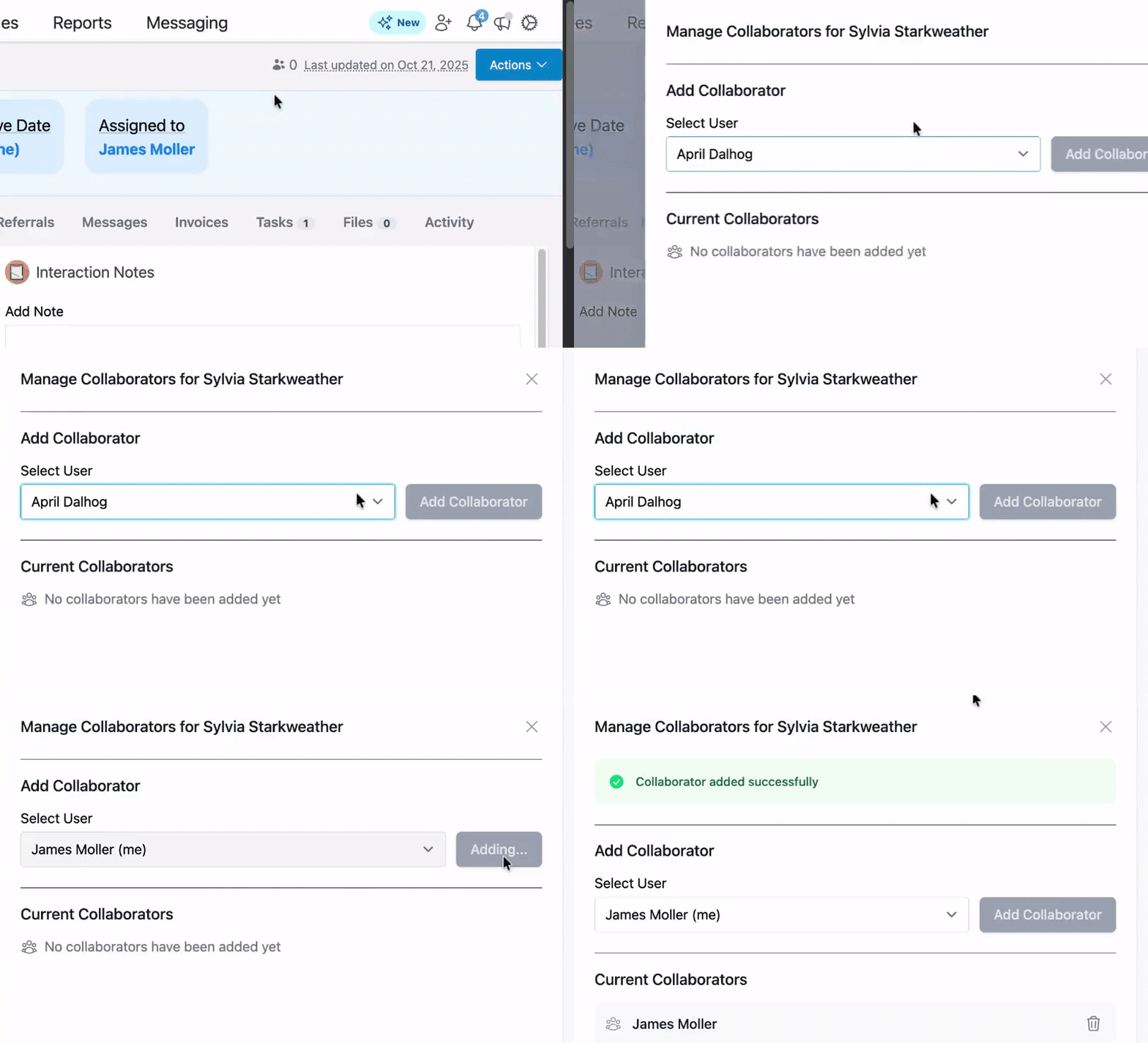
There may be times when you want to share ownership of a client without changing the user a client is assigned to. With Premium, adding a user as a collaborator on a client profile makes this possible!
Mailbox Sync

Would you like emails sent from your personal email to show in the corresponding client, community, or referral source profile? With Senior Place mailbox sync, you can do just that!
Customize your Hosted Intake Form
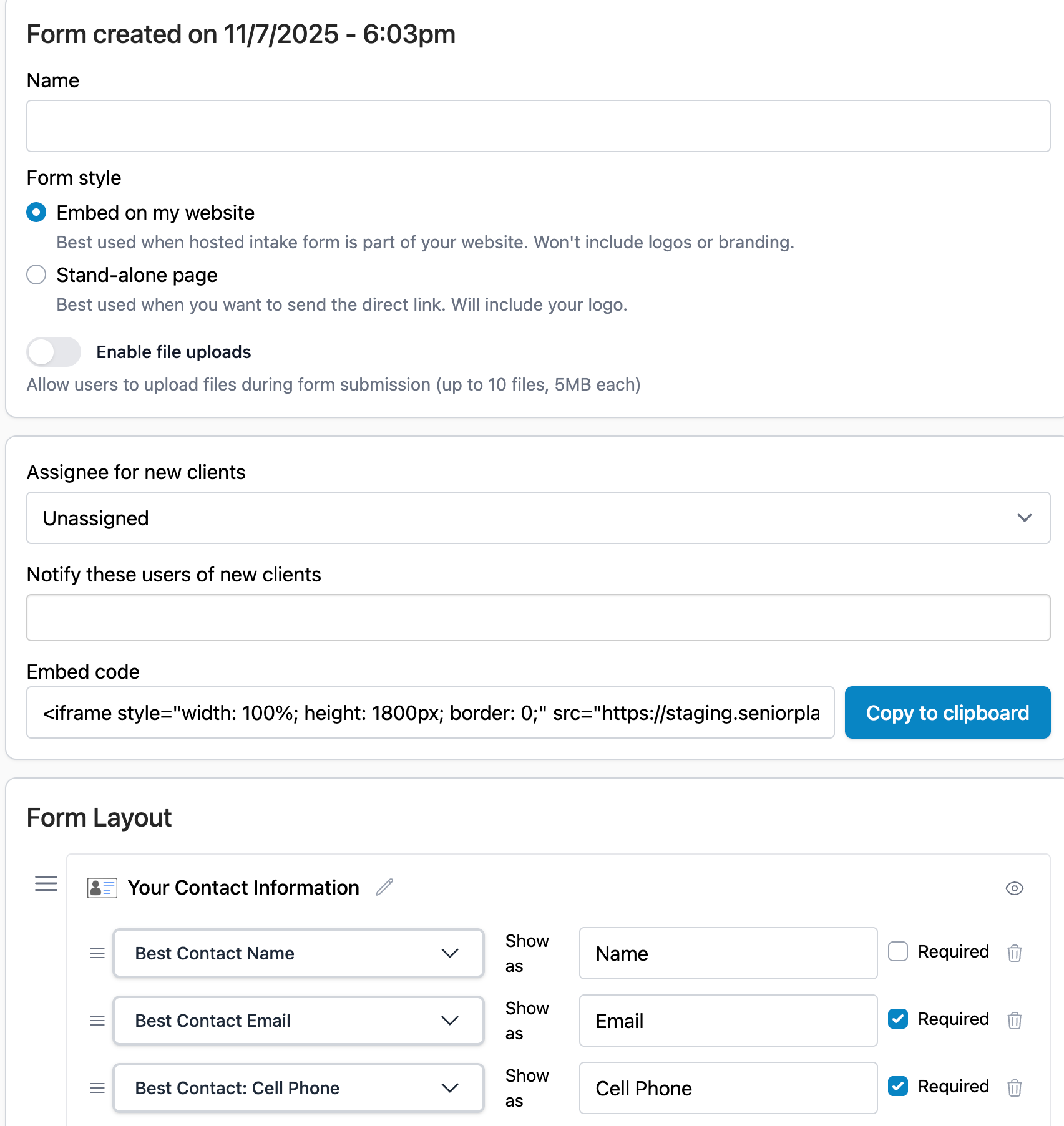
Senior Place's core package includes one Hosted Intake Form; however, on Premium, you get access to unlimited forms and unlimited customization of those forms. Additionally, you can use those forms to provide personal referral links to your referral sources and Client Update links to your client contacts.
Unlimited SignWise Templates
While the two SignWise templates* that are included in our core package work for many of our customers, you may find that you need three, four, or even ten SignWise templates to support the work you do! Senior Place Premium enables you to create unlimited SignWise templates.
*Templates refer to the signature template you create before sending it to a client, community, or referral. This could be a contract, disclosure agreement, NDA, or something else entirely.
Unlimited Saved Custom Reports
In Senior Place's core package, every user can save a single Custom Report; however, with Senior Place Premium, you can save as many Custom Reports as you'd like! Rather than take the time to rebuild the report you need, you can simply create it once and save it for future use.
How Do I Get Started?
If you're interested in seeing a live demo of Senior Place Premium features or would like to try them yourself for a limited period, let us know by reaching out to support@seniorplace.com!
Will Senior Place Premium Continue to Get More Features?
Yes! We're dedicated to building valuable features for our core package as well as Premium. Whether you choose to get Premium or not, you can rest assured that you won't be left out.
Have more questions? Feel free to reach out to us at support@seniorplace.com!